
See what your coffee runs really cost.
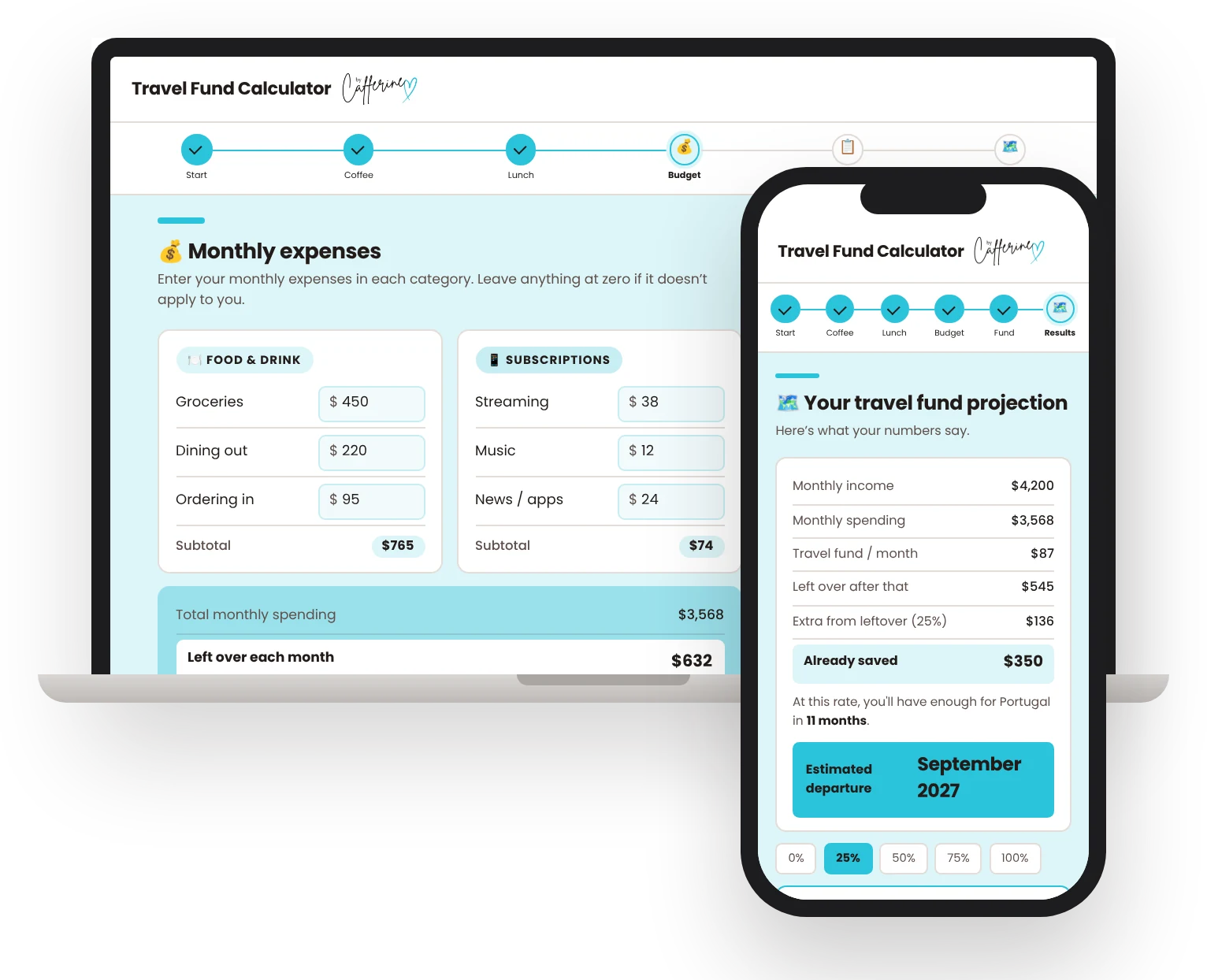
Start with your coffee runs. Then add your whole month: rent, bills, subscriptions and the rest. See what's left over and how soon you could leave.
 Made by Catherine, who travels six months or more a year. Meet her
- Covers your whole month, from rent to subscriptions
- Shows what's left over and how fast your travel fund grows
- Gives you the month you could leave for your trip
- Suggests where to redirect money and what it could get you
$5 a day doesn't feel like much.
Until you see it for the whole year. As you fill it in, the calculator tells you what your habits add up to, in trips.
$1,274/year on coffee runs. That's a round-trip flight and a few nights.
Coffee and lunch runs: $4,186/year. That's 123 days of budget travel in Colombia (about $34/day).
Skip one in four meals out and that's $840/year going toward Portugal.
Real messages from the calculator, using example numbers. Yours will match your own spending.
How it works
One sitting, no spreadsheet skills needed.
Add your daily habits
Coffee, snacks and bought lunches. See the weekly, monthly and yearly total right away.
Add your monthly bills
Rent, groceries, subscriptions and the rest. See what's left over every month.
See your travel fund
How much you could put aside, how fast it grows, and the month you could leave.
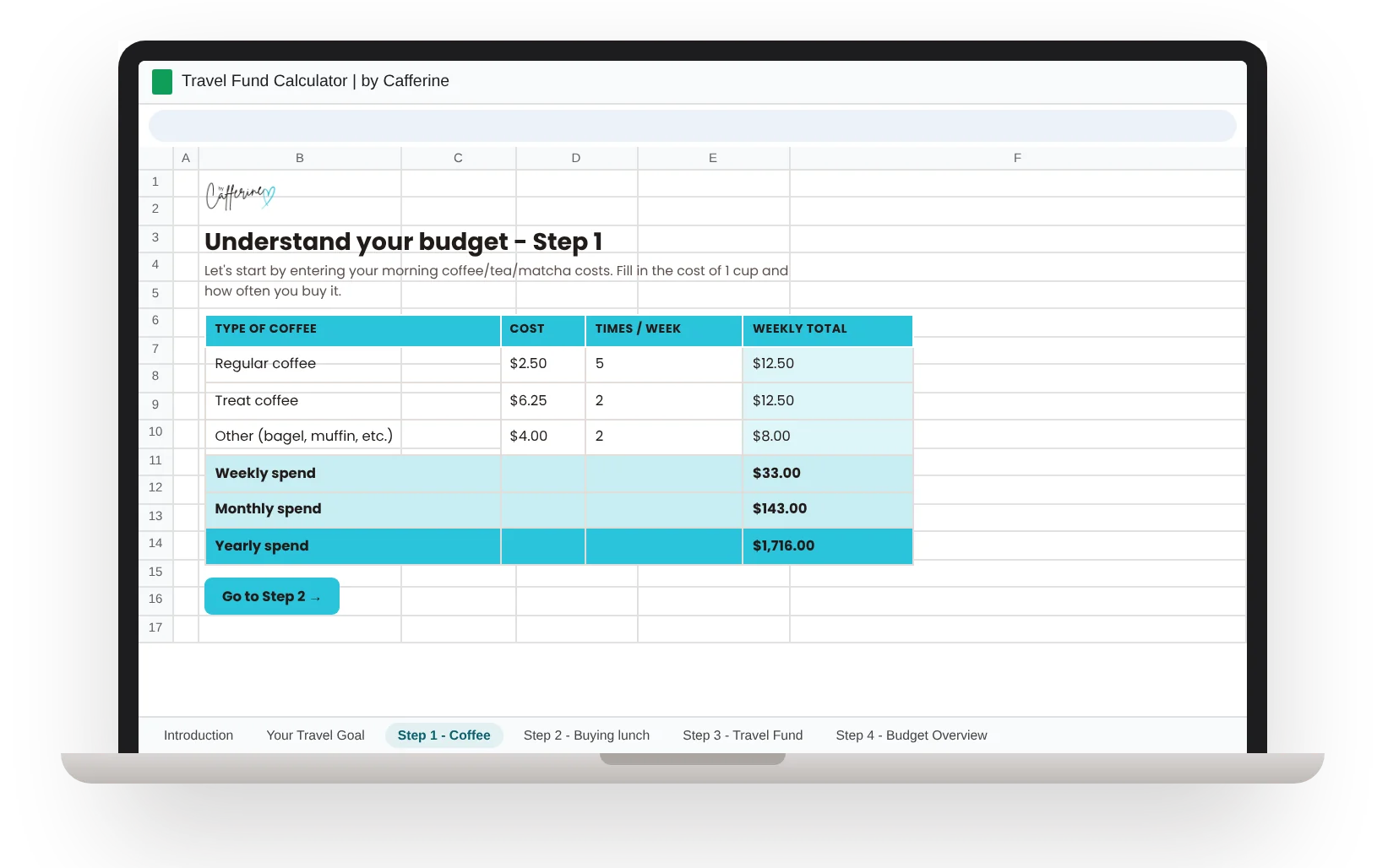
Prefer a spreadsheet?
Get the same numbers in a Google Sheet that's yours to keep. Each tab walks you through one step, and you can come back and update it whenever your spending changes.
See the Google SheetPick your version
Get your answer in one sitting, keep it updated all year, or both.
The web app
Find out exactly when you can leave.
- Your real monthly budget, from rent to subscriptions
- What's left over each month, and how fast your travel fund grows
- The month you could book your trip
- Where to move money, and what it could pay for on your trip
Works on your phone or computer. Nothing to download.
Get the web appWeb app + Google Sheet
Get your answer today and keep it current all year.
- The web app, for your numbers in one sitting
- The Google Sheet, to update as your life changes
- Save $10 compared with buying both
The Google Sheet
Watch your travel fund grow, month after month.
- 77 expense lines in 12 categories, from rent to haircuts
- Change any number to see how much more you could save
- Guided tab by tab: you fill in the boxes, it does the math
- Shows the month you could leave, too
Lives in your Google Drive. Needs a free Google account.
Get the sheetOne-time payment. Card or PayPal through Gumroad, and your link arrives by email right away. All sales are final since you get instant access. Not sure yet? Try the free version first. If anything isn't working, email me and I'll sort it out.
Questions
Can't I just do this in a free spreadsheet?
You could. Most people never get past the blank rows. This one needs no spreadsheet skills: it's laid out step by step and guides you through every number. It already knows what to ask, turns your habits into days of travel somewhere real, and gives you the month you could leave, plus the easiest changes to get there sooner. It takes one sitting.
Do I need to download anything?
No. The web app runs in your browser, on your phone or your computer, and the Google Sheet opens in Google Sheets. There's nothing to install. You get your link right after you buy.
How long does it take?
One sitting, for either version. You start with your daily habits and see what they add up to in a year right away, then build up to your full month, with your numbers updating as you go.
Does it work in my currency?
Yes. The web app works in CAD, USD, GBP, EUR and AUD. Pick yours and every number follows it.
What do I need for the Google Sheet?
A free Google account. You make your own copy and it's yours to keep.
Is this a budgeting app?
No bank login, no subscription, nothing to sync. Budgeting apps show you where your money went. This shows you where it could go: you type in your numbers once and get a date, the month you could leave, plus the changes that would get you there sooner. It takes one sitting.
What happens after I buy?
You pay once through Gumroad (card or PayPal, and checkout shows the price in your currency). Your link arrives by email right away: the web app opens in your browser, and the Google Sheet link makes your own copy. Your answers save in your browser, so you can come back and change any number.
Does it work for couples or families?
Yes. Add your partner's take-home pay under "Other income" and enter your shared bills. Family costs have their own line, and the trip budget is whatever your whole crew needs.
My income changes every month. Will it work?
Yes. Use what you take home in a typical month. Want a date you can count on no matter what? Use a slow month instead, and any better month gets you there sooner.
What if I'm in debt or overspending?
It'll show you honestly. If you're spending more than you earn, it tells you the gap instead of giving you a date, and the quick wins show where the easiest money is.
Is it only for budget backpackers?
No. The daily travel costs it shows are for budget travel, so they're a floor. Your trip budget can be whatever your style is, and that's what your departure date is based on.
Where do the travel costs come from?
Daily costs for a budget traveler (a hostel bed or simple room, local food, getting around and a few things to do), checked in October 2026 against at least two sources each: Hostelz backpacker budgets, BudgetYourTrip, Price of Travel, Nomadic Matt and similar travel-budget guides. Flights are rough estimates by region. Real prices vary by season, so treat them as a guide.
Can I get a refund?
All sales are final, since you get instant access to a digital product. Not sure yet? Try the free version first. If something isn't working, email me at hello@bycafferine.com and I'll help.
Is it only for travel?
No. It works for any goal you're saving toward. Travel is just the example it uses.
Made by Catherine
I'm a marketer and solo traveler. After years in survival mode, I started building a life around what I actually wanted: more freedom, more adventure, and no more waiting for permission or the “right time.” Today I spend six months or more a year exploring the world while building a career on my own terms.
It started with something as unglamorous as knowing where my coffee money was going. This calculator is the first tool I built so you can find out where yours goes.
Follow along on Instagram →





Want more freedom? Join the community.
I spend six months or more a year traveling, and I didn't come from money. I figured out what was holding me back and started removing those constraints, one by one. I'm still learning, and I'll share what's working as I figure it out, plus the tools I build along the way, so you can build your own version of freedom.
An email when I have something worth sharing. Unsubscribe anytime.